
Losing important data can happen at any time, whether accidentally erased, deleted, or lost due to technical issues. You will need quality data recovery software to get those important photos, documents, or videos from hard drives, SSDs, USB drives, memory cards, and other storage options.
Here's the list of the top 10 software solutions to choose the right one faster.
Importance of Data Recovery Software
Data is vital today, and the total amount created globally daily reaches 181 zettabytes. Hardware failures, ransomware attacks, or even user errors can erase priceless assets and cost companies up to $1.85 million per incident on average. Among the best data recovery tools on the market, there are solutions supporting scans of 1,000+ file types and formats on Windows, Mac, Linux, and mobile platforms.
It is always wise to buy proven software rather than test free versions that often show poor results under stress. The choice below guarantees non-destructive scans not cause any data loss.
Key Considerations While Picking Data Recovery Software
The process of selecting the best data recovery software goes beyond picking a popular tool.
1. Compatibility
You need to be aware of the operating system requirements first. It can be Windows or Mac OS. Additionally, software must fit your storage medium (HDD, SSD, USB drive, SD card) and file system type.
2. Type of Files
It is necessary to remember that each program is better suitable for various types of documents. Therefore, choose software depending on file types you want to restore. Some applications deal excellently with documents while others are better to restore photo albums or emails.
3. Recovery Scenarios
Pay attention to the scenarios covered by software. For example, some programs are capable only to recover files accidentally deleted. Meanwhile, other programs are able to recover lost partitions or restore a completely formatted hard disk.
4. User Interface
It is recommended to pay attention to the interface of software. The software is supposed to be easy-to-use. It will be great if it will be accompanied by an intuitive user guide and step-by-step instructions.
5. Software Performance
Customer reviews allow finding out how effectively the application functions in practice. Reliable software should not have any problems with file restoration. Moreover, there shouldn't be a risk of further data damage.
6. Preview Functionality
You can use this tool to verify your files before performing the recovery process. It will save your time and make sure you recover your intended files, particularly if you have photos, videos, or documents.
7. Pricing & Cost Considerations
You need to take into consideration different pricing options. There are some tools that provide you with free file recovery services but with restrictions. On the other hand, there are applications where you have to pay upfront or on monthly basis.
8. Customer Support Availability
Having customer support available can be extremely important. It should be easily reachable via live chats or email support.
Top 10 Best Data Recovery Software Recommendation
1. Stellar Data Recovery Professional for Windows (Top Choice)
Stellar Data Recovery Professional for Windows leads our rankings due to its unmatched deep scan algorithms, bootable recovery environment, and comprehensive Windows-specific features. Stellar can tackle even the most difficult Windows-related cases like:
Lost partition caused by failed Disk Management commands
Disk drive using BitLocker encryption (password recovery mode)
Dynamic disks and file systems recovery
Boot sector damage due to Windows update issues
2. EaseUS Data Recovery Wizard Technician
EaseUS has a simple interface but with strong data recovery capabilities. Among other options, EaseUS has file deletion recovery, formatted drive restoration, and Windows system crash recovery. Technicians can use the software across various machines. It also supports partition recovery.
3. MiniTool Power Data Recovery
MiniTool has a minimalistic yet powerful program that enables you to retrieve your lost files or data. Recovered files may be stored on corrupted partitions, USB drives, and even on SD cards. The software interface is easy-to-use.
4. Recuva Professional
This program is recognized for its straightforwardness and speed. It is most efficient when it comes to recovering files that have been deleted relatively recently from Recycle Bin, USB flash drive, or memory card. It has a secure erase function that ensures total elimination.
5. Disk Drill Enterprise
This software provides in-depth scanning, partition recovery, and other functions such as data protection and backup options. Disk Drill can work with all types of file systems and storage media. It has an intuitive user interface that makes advanced data recovery easy.
6. R-Studio
This software is an expertly engineered data recovery program that allows for highly complex data recovery operations. It is commonly used by professionals for data recovery services due to its detailed control features and advanced capabilities.
7. Wise Data Recovery
Wise Data Recovery is a small utility that specializes in fast scans and speedy file recovery.
8. DMDE Professional Edition
DMDE can be used by those with technical skills to perform sophisticated operations like disk editing, partition recovery, and file recovery with great accuracy. This tool is very efficient although it requires some level of expertise in its use.
9. AnyRecover
This tool allows recovery from deleted, corrupted, or formatted drives and has a user-friendly interface along with good recovery abilities. It is suitable for both novice and professional users.
10. TestDisk and PhotoRec
The two tools TestDisk and PhotoRec work well with partition recovery, repair of boot sectors, and file recovery respectively. They are very efficient programs, although they have a difficult command line interface for users who are novices.
How to Recover Data: Step-by-Step Guide
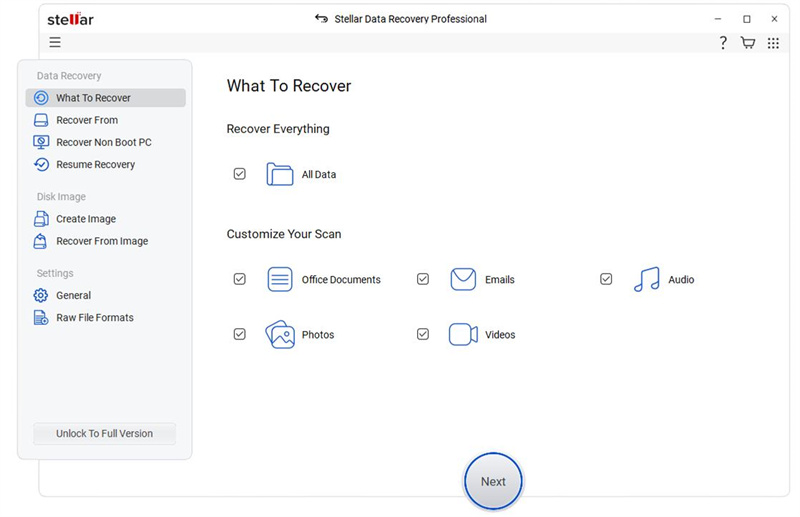
Step 1: Select File Type
Choose the type of files you want to recover (documents, photos, videos, etc.), or select “All File Types” if unsure. Click “Next.”
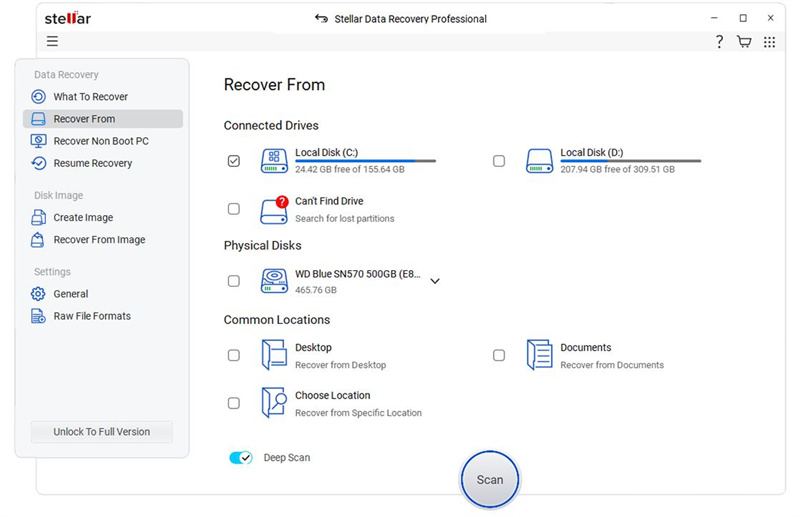
Step 2: Select Recovery Location
Choose the folder, drive, or external device where the data was lost. Click “Scan.”
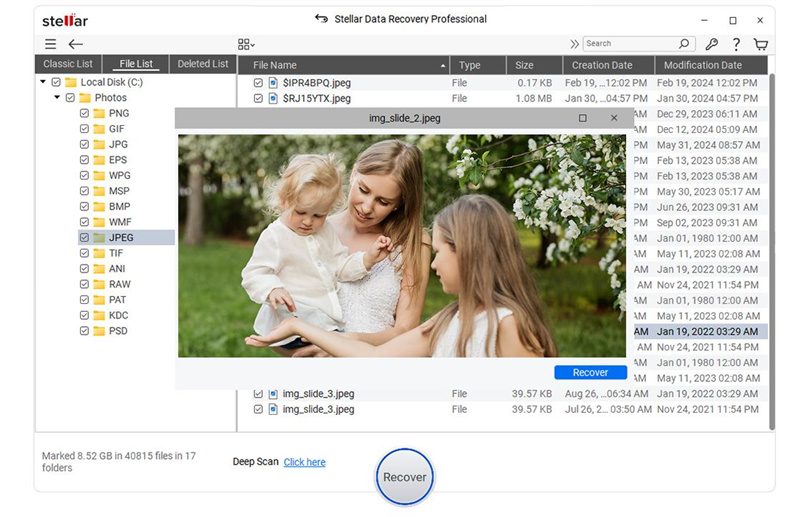
Step 3: Scan and Recover
Let the scan complete, then preview and select the files you need. Click “Recover” and save them to a different location.
Conclusion
It is true that losing important data may be distressing and random, but using the proper recovery software will undoubtedly reduce the stress and anxiety that comes with such an event. Regardless of whether one deletes his/her data by accident, or if the cause of the problem lies within the computer system itself – for instance, because of viruses, system crashes, reformatting, etc., using a recovery software will definitely increase the likelihood of retrieving such data.
Finally, it is advisable that one picks out a tool based on their own needs. These needs may range from usability to recovery features to price. Nonetheless, what one should never forget is to check compatibility with his/her operating system and the type of data he/she wishes to recover.
