A few months ago, I deleted a bunch of photos from my Android phone to free up space. But then, about an hour later, I realized I had deleted the only copy of a picture from my cousin's wedding. Gone. Just like that.
I started looking for some kind of trash or recycle bin folder. My Windows laptop has one. My Mac has one. Luckily, there was one in my Android’s gallery from where I deleted it, and I was able to restore my files from the recycle bin. But as you know, I have a habit of digging deep into functions and features, so a few questions just popped up in my mind.
Does Android even have a Recycle Bin? Does every Android device offer a recycle bin, and most importantly, how does the recycle bin feature in Android work? The answers turned out to be interesting.
So, Does Android Even Have a Recycle Bin?
Over the years, you must have seen a recycle bin in your Android device gallery, but it turns out to be something else. Android devices do not really have a recycle bin. Not in the way your computer does.
That’s because Android does not have one central recycle bin for your whole phone. When you think of a recycle bin on a PC, there’s one folder where everything deleted is moved. You can open it, scroll through, and put back your deleted files. Android storage does not work that way, at least not at the system level.
When you delete a file on Android, the phone does not actually erase it right away. The space that the file was sitting on gets marked as “available.” That means the phone can write new data over it whenever it needs to. So technically, your deleted file is still there, just waiting to be replaced.
So, why does Android have a Recycle Bin?
Do you know the recycle bin on Windows came from Microsoft back in 1995? Before that, deleting a file was permanent, and people lost things all the time. Microsoft gave users a safety net. However, Macintosh had a trash can even earlier, in 1984.
When Android was being built, Google was designing an OS for phones. Phones back then had very little storage, maybe 2GB or 4GB on a good day. Adding a system-wide recycle bin would have eaten into that already tight space. The engineers had to make hard choices, and a universal trash bin did not make the cut. Android launched in 2008 without one, and for years, that was just how it was.
As phones grew in storage, with 128GB and 512GB models becoming common, pressure grew to give users better protection against accidental deletion.
Do All Android Phones Have a Recycle Bin?
Some Android phones have a feature that resembles a recycle bin, but it is not an official Android feature. It is coming from the phone maker.
Samsung, for example, built a trash folder right into their Gallery app and their My Files app. If you have a Samsung phone, deleted photos and videos sit in a Trash folder for 30 days before being permanently removed. Xiaomi and Huawei have done similar things with their own versions of Android.
So if you have a Samsung and you thought every Android worked this way, that makes sense. But pick up a basic Android device running stock Android and you will not find the same thing. It is a manufacturer feature, not an Android feature.
Google Photos is a different case. That app, which comes pre-installed on many phones, has its own Trash folder built in. Deleted photos and videos stay there for 30 days. The Files by Google app also has a trash section. But again, these are app-level features. They do not protect every type of file on your phone.
Remember, whether your phone has something like a recycle bin depends on who made it and which apps you use. It is not guaranteed for everyone.
What Actually Happens When You Delete a File?
Okay, so you tap delete on a photo or a document. What happens next? If your phone or app has a trash folder, the file moves there. It is not gone yet. You have a window, usually 30 days, to bring it back.
But if your phone does not have a trash folder, or you have already emptied it, the situation changes. The file is no longer visible to you. But the phone has only marked that space as reusable. The actual data is still physically sitting there until something new gets written over it. The faster you stop using your phone after realizing the mistake, the better your chances of recovery.
Apps like Google Photos warn you before permanently deleting something for a reason. Once that 30-day window closes, there is no easy road back.
What Happens After You Empty the Trash?
This is the part most people do not think about until they are in full panic mode.
Once you clear the trash on your phone, whether it is in Samsung Gallery, Google Photos, or anywhere else, the files disappear from any easy recovery path. But the underlying data on your phone's storage may still exist for a short time if nothing has overwritten it.
That is exactly the situation I was in a few days ago after accidentally clearing some photos from the Trash. The file was nowhere in any folder. I came across an Android Data Recovery tool called Stellar Data Recovery for Android. It is a recovery software you run on your PC.
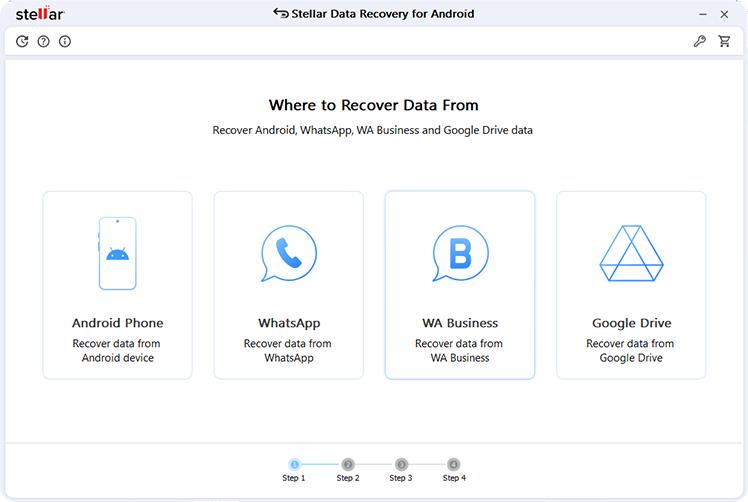
You can connect your Android phone, let the tool scan your phone's storage, and it looks for traces of deleted files that have not yet been overwritten. It can find photos, videos, contacts, messages, and more that are no longer visible on your device.
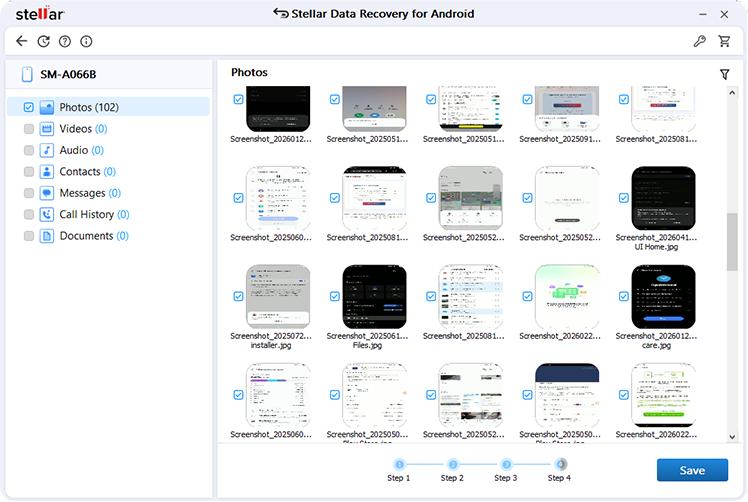
But be careful, because not every deleted file can be saved this way. If the phone has already written new data over that spot, it really is gone. But in many cases, especially if you act fast, a tool like Stellar can be a lifesaver.
Wrapping Up
The recycle bin on Android is not what most people think it is. It is not a single, built-in safety net that stores everything. It is a scattered set of features spread across different apps and phone brands, and some phones do not have it at all in any meaningful form.
The idea behind it goes back decades, to the early days of desktop computers when people realized they needed protection against accidental deletion. Android started without it because of storage limits, and has only partially caught up since then.
If your phone has a trash folder in your Gallery or file manager, use it. Make sure it is turned on. And if you have already lost something and the trash is empty, do not give up right away. Tools like Stellar Data Recovery for Android exist for exactly that moment. Sometimes the file is still there. You just need the right thing to find it.
